UX Designer & eLearning Developer
Nicholas
McGowan
Crafting experiences that educate, engage & endure.
15+ years designing user-centered learning systems for major companies and institutions — from custom D2L templates and 3D interactive web elements to Articulate courseware and professional educational video.
About & Portfolio
Where design thinking meets the science of learning.
Good instructional design isn't about filling screens with content — it's about removing the friction between a learner and the moment something clicks. I build experiences that respect how people actually process information: through interaction, context, and well-timed challenge.
My work spans higher education, aerospace, engineering, and corporate training. The demos below are organised into three categories — Web Interactivity, Articulate eLearning, and Media Production. Select a card to jump directly to that section.
Media Elements & 3D
WebGL models & 360° interactives embedded in courses — no plugins needed.
Articulate Suite
Branching scenarios, simulations & 360° course builds via SCORM and xAPI.
Capture & Edit Pipeline
Screen capture, audio cleanup & file-optimised LMS-ready export.
Web Interactivity — Media Elements & 3D
Passive content loses people. Gamification works because it borrows the same motivation loops as play — meaningful choices, immediate feedback, and something at stake. Completion rates rise when learners feel like they're solving something, not just sitting through it.
The Desk Job Game is a custom mini-game built in Claude Code — no engine, no framework. You work a shift as an instructional designer, triaging requests by matching them to the right tools. Fast thinking is rewarded, guessing is punished.
McGill University — Campus Topography
Explore the 3D model of the McGill campus.
Rotate and zoom to locate the three pinned landmarks on the model before continuing.
Campus Knowledge Check
Which of the three landmarks sits at the highest elevation on campus?
Use the hotspots on the model to locate each building, then select your answer.
McLennan Library — a central hub in the academic core of campus.
The iconic main entrance to campus on Sherbrooke Street.
One of Canada's oldest natural history museums, set into the upper campus slope.
Debrief
Redpath Museum sits at the highest point of the three landmarks.
Nestled into the upper slope of Mount Royal, the Redpath Museum sits noticeably higher than the Library and the Roddick Gates — a detail that becomes obvious once you can explore the terrain in 3D rather than on a flat map.
The UX Designer's Desk
The briefs are piling up and everyone wants it done yesterday. Match the right tool to the right problem — before the queue gets the better of you.
Jet Engine — 3D Navigation
Get familiar with the model before starting.
Try each of the controls below on the 3D model to unlock Continue.
Engine Check — Spot the Problem
A pilot reports the engine isn't generating enough thrust on takeoff.
Fuel and temperature are both fine — but fan speed is low. Tap the component on the model responsible for generating thrust.
Tap a hotspot on the 3D model to answer.
Debrief
The fan is the engine's primary source of thrust.
In a turbofan engine, the large front fan pulls in huge volumes of air and pushes it rearward — that's what moves the aircraft. When fan speed is low and everything else reads normal, the fan is the first place to investigate. This is the same diagnostic logic technicians use in real engine checks.
Articulate eLearning — Storyline
Storyline 360 is far more than a slide tool — it's a development environment for building whatever the content demands. The two examples below demonstrate opposite ends of that spectrum: a high-fidelity software simulation that replicates a live enterprise system without touching production, and an immersive 360° language learning experience that puts learners inside the environment they're studying. Same tool, completely different thinking.
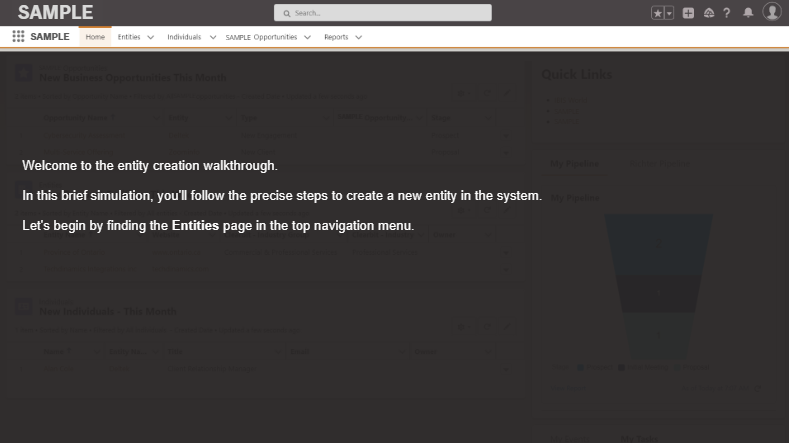
Challenge
Restricted live environment. Employees needed hands-on software training but the production system was off-limits due to security and compliance.
Solution
High-fidelity Storyline simulation. Built a fully interactive "try me" replica — screen captures, hotspots, branching feedback, and variable tracking — so learners practise safely without touching production.
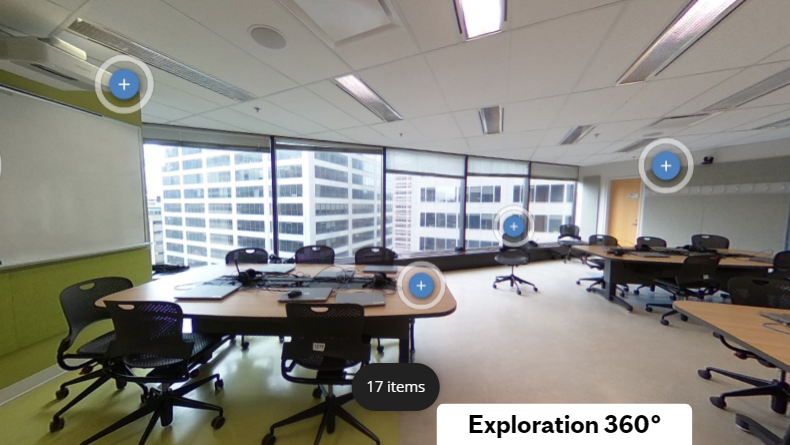
Challenge
Passive content isn't enough. Learners were disengaged with slide-based modules covering physical spaces and equipment — reading about a room is no substitute for being in it.
Solution
Immersive 360° discovery experience. Placed learners inside a photorealistic environment where they navigate the space freely and click visual hotspots on real objects to surface contextual learning — turning exploration into the instruction itself.
Media Production — Quality Without the Bloat
Great educational video isn't just about looking polished — it's about knowing how to capture, edit, and export at the highest quality while keeping file sizes lean enough to stream and deliver reliably inside any LMS or platform.
⚙ Production Pipeline
Build the Production Pipeline
Drag each stage into the correct position in the workflow. Drop it where you think it belongs.
Experience

2017 — Present
McGill University
Courseware Developer
Leading the design and development of digital learning experiences across McGill's faculties for 8 years. Responsibilities include custom D2L Brightspace template development, Articulate Storyline courseware production, 3D interactive web elements, and educational video production. Collaborate closely with faculty, instructional designers, and IT to deliver accessible, user-centered solutions at scale.

2023 — 2024
Greyrock Learning
Co-Founder & eLearning Developer
Co-founded Greyrock Learning with two partners, launching a boutique eLearning studio. Secured and delivered contracted projects for RICHTER, focusing on Articulate Storyline development: building interactive software simulations, custom branching scenarios, and engaging elements. Produced high-fidelity instructional videos and custom graphics to support immersive, user-centered online modules.

2015 — 2017
SNC-Lavalin / BGIS
SharePoint Specialist & Data Analyst
Designed and maintained SharePoint intranet portals for internal communications and knowledge management across multi-site engineering operations. Performed data analysis and reporting to support facilities management decisions, using Power BI and Excel to surface operational insights for leadership teams.

2012 — 2015
Pratt & Whitney Canada
eLearning Specialist / Developer — HR & Health & Safety
Developed and maintained eLearning modules for Human Resources onboarding and mandatory Health & Safety compliance training across Pratt & Whitney Canada's facilities. Worked with subject matter experts to translate regulatory requirements and HR policies into engaging, SCORM-compliant digital courses, ensuring certification tracking through the LMS.
Contact
Let's work together.
Whether you need a full learning program or a critical module reimagined, I'd love to hear about your project.